
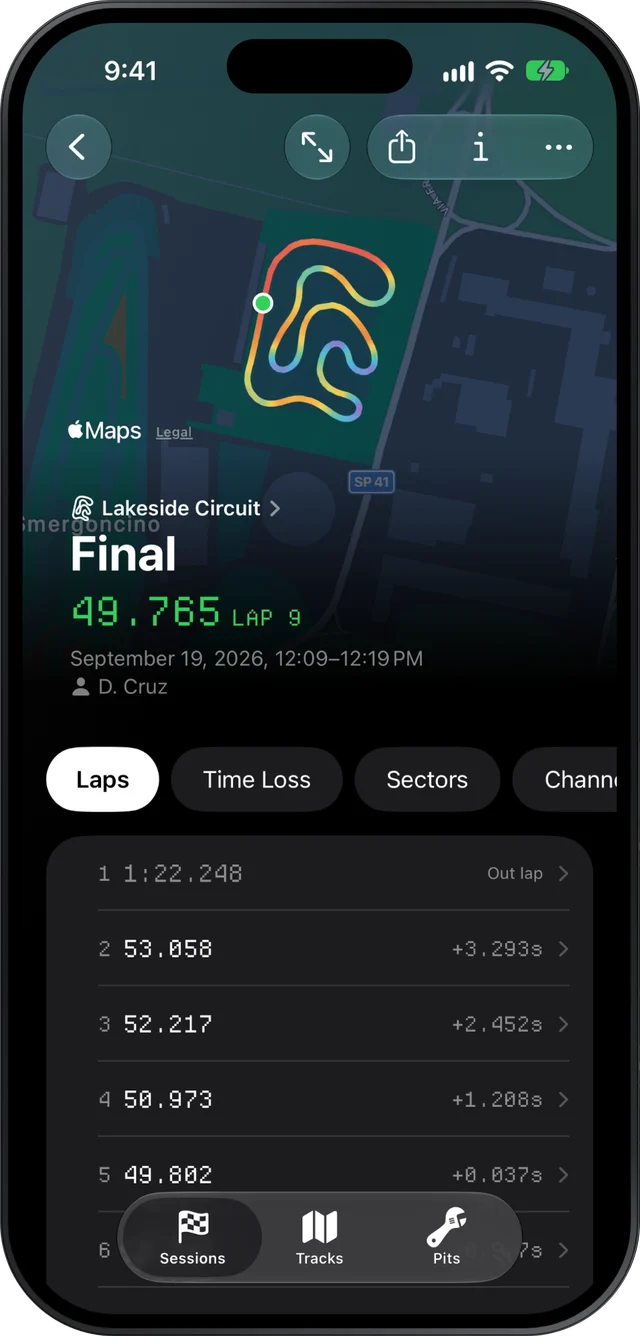
Slicks opens the XRK and XRZ files a MyChron 5 or 5S records and shows them on an iPhone, iPad or Mac: every lap split into sectors, your theoretical best, the corners that cost you the most time, and peak RPM and temperatures against your engine's window. It reads the file on the device, with no AiM software and no signal at the track.
What your MyChron 5 is recording
Most MyChron 5 owners use it as a lap timer with a tach. The screen gives you a lap time, the revs and a temperature, and that is where most of the reading stops. Behind the screen the logger is saving a lot more to every session file:
- GPS position, many times a second. Your speed, your line round the track and the cornering and braking forces are all worked out from it.
- RPM, from the lead wrapped round the plug lead.
- One or two temperatures, depending on the version and what is plugged in: water, cylinder head or exhaust (EGT).
- Lap times, from each crossing of the start line.
- Anything an expansion adds, such as throttle, brake pressure, steering or lambda, if your kart has those sensors fitted. Most karts do not.
None of that needs a sensor you have not already got. If your MyChron has a GPS fix and a plug lead, you have enough for the whole of the session screen.
Getting the sessions off the logger
Slicks does not talk to the MyChron. The file comes off it the way it does today, with AiM's tools:
- Download the session. Either RaceStudio 3 on a Windows laptop, over the MyChron's Wi-Fi or its cable, or AiM's RaceStudio 3 app for iPhone and Android.
- Find the file. RaceStudio 3 saves each download as a compressed
.xrzfile in a folder for that day. Our page on opening XRZ files says exactly where, and how to bring a whole season's worth over at once. - Get it to your phone, iPad or Mac. AirDrop, the Files app, a shared folder such as iCloud Drive, Dropbox or Google Drive, Messages, email or a USB stick. There is no need to unzip anything.
When you bring in a single new session, Slicks asks what changed on the kart before it shows you a number. That is on purpose: once you have seen a fast lap, it is easy to remember the change that "obviously" made it.
What you see once it is open
The track, driver and date come from the file. The top of the screen is your fastest lap drawn on the circuit in the colours of its speed. Under it, one page at a time:
- Laps: every lap with its gap to the fastest, the out lap marked, and how many laps were within half a second of your best.
- Time Loss: the corners where your other laps lost the most against your fastest, with the tenths, the speed you were down at the slowest point and how many metres earlier or later you braked.
- Sectors: the best time through each part of the lap and the theoretical best they add up to.
- Setup: the peaks your MyChron recorded against the window for your engine, every channel's lowest and highest reading, and what you wrote down about the kart.
Tap any lap to see it on its own: its trace on the map, and RPM, speed, the temperatures and the forces charted along one distance axis with a single cursor across all of them.
If you only ever look at RPM and water temperature
A lot of MyChron 5 owners check two numbers and nothing else. That is a fair place to start, and Slicks makes both more useful.
RPM. The peak is only half the story. What tells you about gearing is where on the lap the revs top out. Colour the track map by RPM and the end of each straight shows whether the engine is running out of revs early or never getting there. If the peak arrives well before the braking point on the longest straight, the gearing is short. Our page on reading gearing from the data goes through it with numbers.
Water temperature. On the Setup page the peak sits against the window for your engine, in plain words as well as colour. Slicks has windows for Rotax Senior, IAME X30 and KA100, Vortex Rok GP and Yamaha KT100. They are the ranges the karting community quotes. If your tuner gave you different numbers, theirs win.
Once those two are habit, the Time Loss page is the next one worth learning. Start with the corner at the top and nothing else.
A MyChron 5 and more than one device
Sign in with a free Slicks account and a session you open on your phone at the track is on your iPad and Mac when you get home. The Tracks tab keeps every session by circuit, so a season of MyChron files becomes a history at each track, with your best there at the top. Upgrading to a MyChron 6 later changes nothing here; see MyChron 6 data analysis for what the newer logger adds.
What Slicks does not do for a MyChron 5 owner: it does not download from the logger, it does not set the
logger up (channels, alarms and tracks stay in RaceStudio 3), and it does not open RaceStudio 2 .drk
files. It reads XRK and XRZ files only.
