
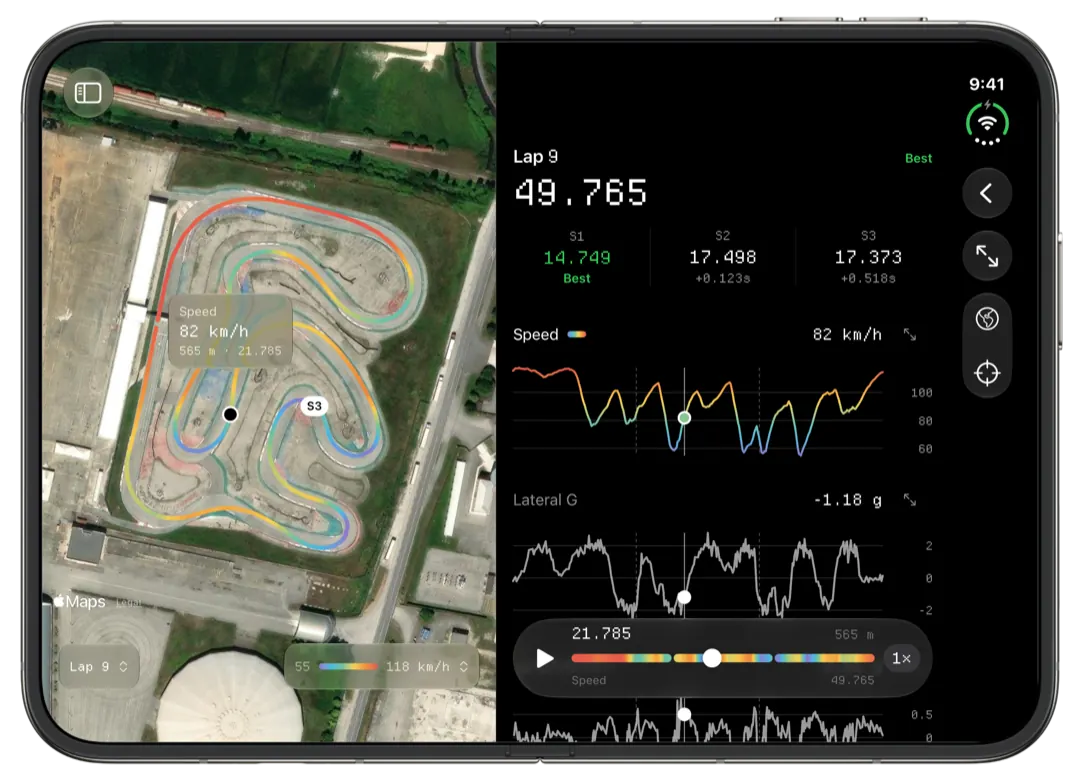
Slicks reads the RPM channel from your AiM or MyChron session and shows the session's peak against your engine's window, where on the track it happened, and the sprockets you wrote down. That is what choosing a gear comes down to: the RPM at the end of the longest straight, on a clean lap, with the teeth beside it.
The number gearing comes down to
Gearing trades acceleration out of the slow corners against speed at the end of the longest straight. The reading most tuners start from is the RPM just before you brake at the end of that straight. You want the engine arriving near the top of the range where it pulls, not getting there halfway down and sitting on it.
The ratio is the rear teeth divided by the front teeth.
- A bigger rear or a smaller front is shorter gearing: more RPM at the same speed, harder acceleration, and the top of the range comes sooner.
- A smaller rear or a bigger front is taller: fewer RPM at the same speed, a longer pull, softer exits.
The arithmetic is worth knowing before you reach for a sprocket. A 12-tooth front on an 80 rear is 6.67:1. An 81 rear makes it 6.75, about 1.25% more engine speed at the same road speed, or roughly 175 rpm at 14,000. An 11 front on the same 80 rear makes it 7.27, about 9%. One tooth on the front is worth around seven on the rear at that size, which is why the fine steps are made at the back.
What too short and too tall look like
On the lap screen, RPM and speed are charted against the same distance axis, with one cursor across both and the map. The shape of the straight tells you most of it.
Too short:
- RPM climbs fast, then goes flat well before the braking point, and the speed trace flattens with it.
- On an engine with a limiter, the peak sits at the limiter for metres at a time.
- The peak reads above the window on the Setup page.
Too tall:
- RPM is still climbing when you brake. The engine never gets to where it makes its power.
- The dip out of the slowest corner is deep, and the kart is slow to pick up from it.
- The peak reads below the window.
Neither is a fault on its own. A track with one long straight and a tight infield pulls the answer one way, a flowing track the other. The data tells you which side of the compromise you are on.
Finding the peak, and checking it is real
- Open the Setup page. The session's peak RPM sits against the window for the engine you picked in Pits, in plain words as well as colour. Rotax Senior and IAME X30 have RPM windows; for the other presets the peak is shown without a verdict.
- Colour the map by RPM. On the fastest lap, the hottest colour should sit at the end of the longest straight. If it sits somewhere odd, the peak came from a wheel lifting over a kerb or a hop, not from the gear. Hold the map at the braking point to read the exact value there.
- Read the slow corner too. Scrub the lap's RPM chart to the slowest point on the track and note how low the engine drops. That is the other end of the compromise.
- Check more than one lap. A lap in someone's draft carries more RPM to the end of the straight than a lap on your own. Pick two laps and use lap comparison: both RPM traces on one distance axis, with the gap between the laps drawn along the lap. Gear for the straight you will actually race on: in a pack, the draft is what you will meet.
On a Mac, the Laps tab charts one channel across every timed lap, so you can see at a glance whether the peak RPM is steady through the session or only one lap touched it.
Writing the gearing down
When you import a single new session, Slicks asks what changed on the kart before it shows you any numbers. Tick gearing, enter the front and rear teeth, and they sit on the Setup page next to the peak RPM they produced. Pressures, carb and the rest go in the same place, which matters, because a change of jetting moves the RPM as well. Our page on keeping a kart setup log covers the rest of it.
Did the change work?
Slicks does not overlay two sessions, so a before-and-after is a read of two sessions one after the other. The Tracks tab keeps every session at a circuit together, which makes that quick.
- Peak RPM. Did it move by about what the arithmetic said? If you went up a tooth on the rear and it barely moved, something else changed too: wind on the straight, the track rubbering in, a new set of tires.
- The sectors. Split the lap so the long straight sits in one sector and the slow infield in another. A shorter gear should gain in the infield and may give some of it back on the straight. Sector analysis shows the best time through each one.
- The best lap. Last, because it is the noisiest of the three.
Change one thing at a time. Gearing and pressures in the same session and you will not know which one helped.
What Slicks does not do: it does not calculate a ratio or suggest a sprocket, it has no gearing calculator and no custom RPM windows, and it cannot overlay the RPM traces of two different sessions.
