
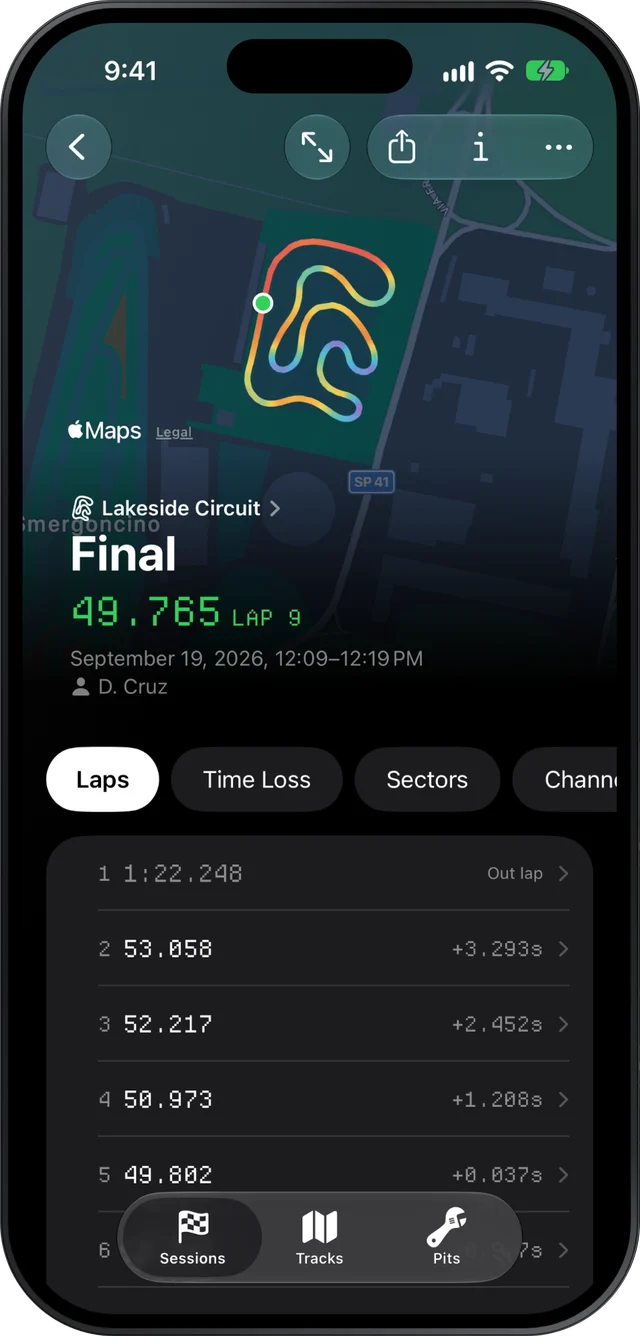
If you have just bought or borrowed your first MyChron, Slicks turns its files into a short list of answers you can use: your lap times and how consistent they were, where on the track the time went, and whether the engine was in its window. It runs on the iPhone you already carry, needs no AiM software to read the file, and is free.
What the logger actually recorded
Your MyChron logged a lot more than lap times. Its GPS knows where the kart was many times a second, which gives speed, your line and the cornering and braking forces. A plug lead gives RPM, and most karts have a probe for exhaust temperature and often water temperature too. All of it is in one file per session, an XRK, or an XRZ when it is compressed.
You do not need to understand every channel to get value from it. Our beginner's guide to reading kart telemetry explains each one and how the speed trace works. This page is about where to start.
Getting the session onto your phone
This catches most beginners out, so it is worth knowing up front. Slicks does not connect to the logger. The session comes off the MyChron with AiM's own tools (RaceStudio 3 on Windows, or AiM's app), the same way you would download it for anything else. From there, send it to your phone by AirDrop, a shared folder, Messages or email, and open it from the Files app. Slicks reads it on the phone, so it works at a track with no signal.
Practise on the sample session first
Before your first track day with data, open Slicks with an empty library and tap Try a Sample Session. It is a real kart session with real laps. Spend ten minutes at home finding your way around it:
- tap through the pages under the map: Laps, Time Loss, Sectors, Setup, Notes
- tap a lap and press play to watch it run round the track
- hold a finger on the map to read the speed at that point
Learning the screens on a session that doesn't matter means the first time you open your own, at the track, you are reading it instead of hunting for buttons.
The first three things to look at
Leave everything else for later. In this order:
- The laps list. Find your best lap, then look at how many laps were within half a second of it. Slicks counts that for you. Early on, that count is a better measure of progress than the best lap.
- The theoretical best. On the Sectors page, Slicks adds up your best time through each part of the lap. If it is well under your best lap, you have already driven every part of a faster lap; you just haven't put the pieces together in one lap yet.
- The corner at the top of Time Loss. One corner, the one that cost you most on average. Look at whether you braked earlier there, or carried less speed through the slowest point. Take that one corner back out.
That's it for your first few outings.
Mistakes almost every beginner makes
- Opening every chart at once. The lap screen charts speed, g, RPM and the temperatures against the lap, all at once. That is useful in month three, not on day one.
- Reading the out lap. Cold tires and a lap that starts in the pit lane make it look like the worst lap of your life. Slicks marks it so you can skip it.
- Setting the wrong engine. The engine checks compare against the preset you pick in Pits. Pick the one your kart runs, or the verdicts are about someone else's engine.
- Not writing down what changed. When you import a single new session, Slicks asks what changed on the kart before it shows any numbers. Answer it, even if the answer is "nothing". In six weeks you will not remember.
- Judging the day by one lap. Your best lap can be a fluke with a tow. Your consistency rarely is.
How it fits your first season
Over a season, the sessions pile up. The Tracks tab groups them by circuit and opens each track with your personal best there, so going back to a track shows you the lap to beat and every session you have run there. Use the Notes page after each session to write the one thing you tried, and next time at that track you start from what you learned instead of from scratch.
Sign in on an iPad or Mac too, if you have one, and the same sessions are there at home for a longer look. When you are ready to compare two laps properly, the page on kart lap comparison picks up where this one stops.
What Slicks does not do for a beginner: it does not set up or download the MyChron, it does not show data while you drive, and it does not read Alfano or other brands' loggers.
