
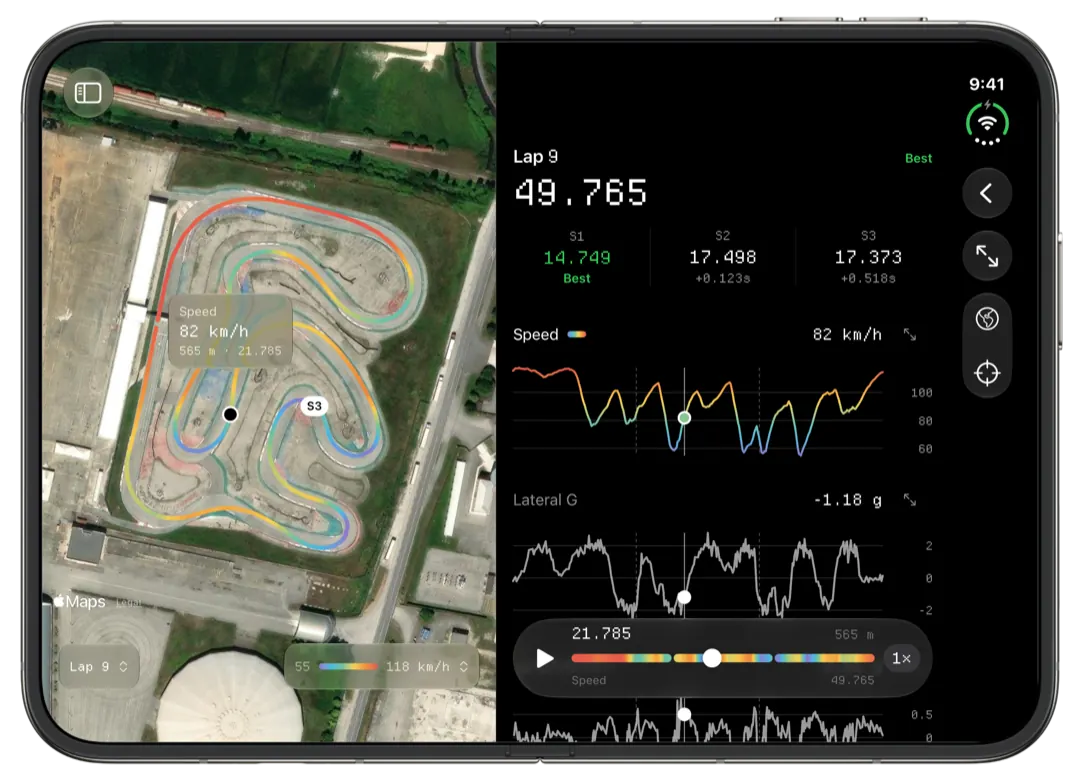
Slicks helps a club racer use AiM or MyChron data through a whole race weekend: testing one change per practice session, checking that qualifying had a clean lap in it, finding the corner to fix between heats, and keeping a log of every gearing, pressure and carb change so Sunday's final starts from what Saturday taught you. It runs on an iPhone, iPad or Mac.
Practice: one change per session
Practice is the only part of the weekend where you can afford to try things, so it is where the data earns most. The rule every experienced club racer gives is one change at a time. Change the gearing and the pressures in the same session and the lap times cannot tell you which helped.
When you import a single new session, Slicks asks what changed before it shows you any numbers: gearing, pressures, carb, axle, track width, caster, new tires or something else, plus the sprockets, the four cold pressures and the tire set. Answer it in the pits while it is fresh. Then read the session against the one before:
- Did the best lap and the theoretical best move, or just one of them?
- Did the engine's peaks shift on the Setup page? A tooth on the rear sprocket shows up in peak RPM.
- Did more laps land within half a second of the best? A change that makes the kart easier to drive often shows there before it shows in the best lap.
Qualifying: was the lap there?
Club qualifying is often only a few minutes, so there are few laps to learn from. The useful question is whether a better lap was in the session. Open Sectors: if the theoretical best is a couple of tenths under the lap you set, the pace was there and it came down to one sector. That tells you whether to worry about the kart before the heats, or just about putting the lap together.
Mark the session as qualifying and, if you fitted a new set, tick new tires. Later in the weekend you will want to know which laps were on which tires.
Between heats: ten minutes, one phone
Heats come round quickly, and the time between them goes on fuel, pressures and getting to the grid. This is where a phone beats a laptop. Open the session and:
- Check the engine's peaks against the window on Setup. As the track rubbers in and the day warms up, the water and exhaust temperatures move. Catch it now rather than in the final.
- Look at the top of Time Loss. In a heat, traffic will have cost you laps, so treat it with care, but a corner that tops the list in practice and again in the heat is a real one.
- Write a line in Notes: what the kart felt like, what you will try.
For more on working fast in the pits, see trackside kart data analysis.
Keeping track of a weekend's changes
By Sunday you have run maybe eight sessions with a different setup in several of them. Each session's Setup page keeps what you wrote at import, and the session type tells you where it sat in the weekend. Before the final, go back through the weekend's sessions and find the one with the best consistency and the engine inside its window, and look at what the kart was running. That is usually a better starting point than whatever you ran last.
On a Mac, the sidebar groups sessions into race weekends, so a whole Saturday and Sunday sits under one heading and the search finds a track or a driver across the season. The Mac app page covers the window in more detail.
Across a season: personal bests by track
Club racing comes back to the same few circuits. The Tracks tab groups every session by circuit, and each track opens with your personal best there and the history of sessions behind it. Before the next round at that track, look at what you ran at your best weekend there, and read your notes from it.
What Slicks does not do for club racers: no official results or positions from the timing system, no weather log, and no laying one session's lap over another session's. Laps can only be compared within one file.
