
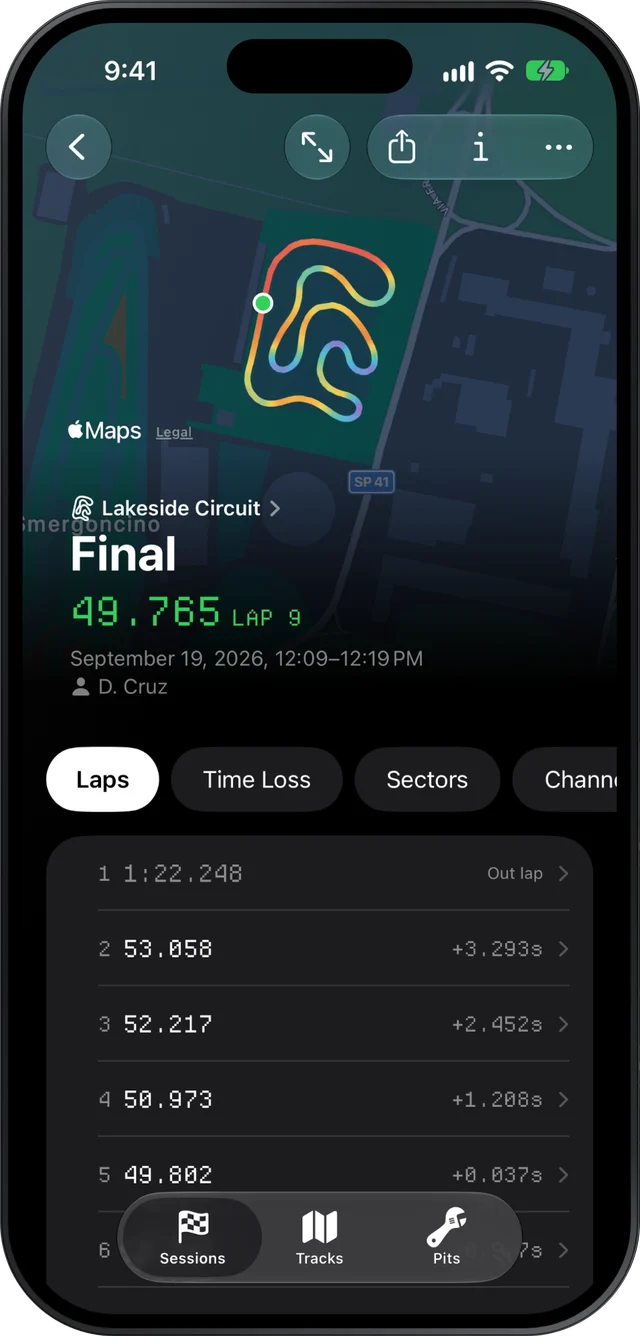
Slicks keeps your karting lap times by track. Every AiM or MyChron session you import is grouped under the circuit it was driven at, and the Tracks tab opens each circuit on your personal best there, with every session you have run at it listed underneath. Inside any session, the laps, sectors and corners show where the next tenth is.
How the Tracks tab files your laps
You do not set anything up. Your logger writes the track name, the driver and the date into every file, and Slicks reads them. Import a session from last Saturday and it lands under that circuit. Import a folder of last season's files and every track you raced at appears, each with its own history.
The tab lists each circuit with when you were last there, how many sessions you have run at it and your personal best. Open one and you see:
- Your personal best there: the fastest best lap across every session at that track, under a 3D drawing of your newest session's fastest lap.
- A trend chart, one point per session at its best lap, with the session that set the personal best in green.
- Every session at that circuit, each showing its own best lap against the personal best, and each a tap away from its full analysis.
Because sessions sync to every device on your account, the same history is on your phone in the pits and on your iPad or Mac at home.
Reading progress across a season
A personal best only moves a few times a year. If it is the only number you watch, most visits look like failure, even good ones. The trend chart helps: a line of best laps that keeps creeping towards the green point says more than the green point alone. To see why it is creeping, open each visit and take three numbers from it:
- The best lap, from the session screen.
- The theoretical best, from the Sectors page: your best time through each sector, added up.
- How many laps were within half a second of your best, from the Laps page.
Here is what that can look like over a season at one club track. The numbers are an example, not real data:
| Visit | Best lap | Theoretical best | Laps within 0.5 s |
|---|---|---|---|
| April | 51.42 | 50.98 | 4 of 16 |
| June | 51.10 | 50.84 | 9 of 18 |
| August | 51.13 | 50.91 | 13 of 17 |
The personal best only moved once, in June. But the gap between the best lap and the theoretical best closed from 0.44 to 0.22, and the consistent laps more than tripled. That driver got better all season. August's best was a little slower than June's, and yet it is the visit to be proudest of: the fast laps stopped being lucky.
Our page on lap time consistency explains why the half-second count says so much.
Why personal bests are not always comparable
Before you read too much into a best lap from one day against another, remember what changes between visits:
- Grip. A rubbered-in track on a cool afternoon can be several tenths quicker than a green one on a hot morning, with the same driver and kart.
- Tires. A best on new tires and a best on a set with three race days on it are different things.
- Engine and class. Slicks keeps one best per track. If you moved up a class mid-season, the old best belongs to a different kart.
- Timing. These are your logger's lap times. They can differ by a few hundredths from the club's transponder results.
Write the conditions in each session's notes ("hot, green track", "used tires, two days old"). Slicks does not record the weather, and a best lap means more when you know what it was set in.
Finding the next tenth inside one session
The personal best tells you where you stand. The session tells you how to move it. Pick your most recent session at the track and go through it in this order:
- Sectors. How far is your best lap from the theoretical best? That gap is time you already drove, in pieces. The theoretical best lap calculator page explains how to read it.
- Time Loss. The corner that cost the most on average, with the tenths lost per lap, the speed difference at the slowest point and whether the braking point moved. Start with the top one.
- Compare. Hold a lap row to pick your best lap and your second-best, and race them against each other. The gap chart along the lap shows where the second one fell behind. Look for the place the gap starts to grow, not where it is biggest.
One corner per session is plenty. Fix it, and the next visit's best lap has somewhere to come from. More on that in time loss by corner.
What it does not do
Slicks tracks bests from your logger's files, not from official timing, and it does not split them by class, engine, tires or weather. It compares laps within one session, so last month's best and today's cannot be overlaid lap against lap. And it only knows about the sessions you import: it does not download from the logger itself.
