
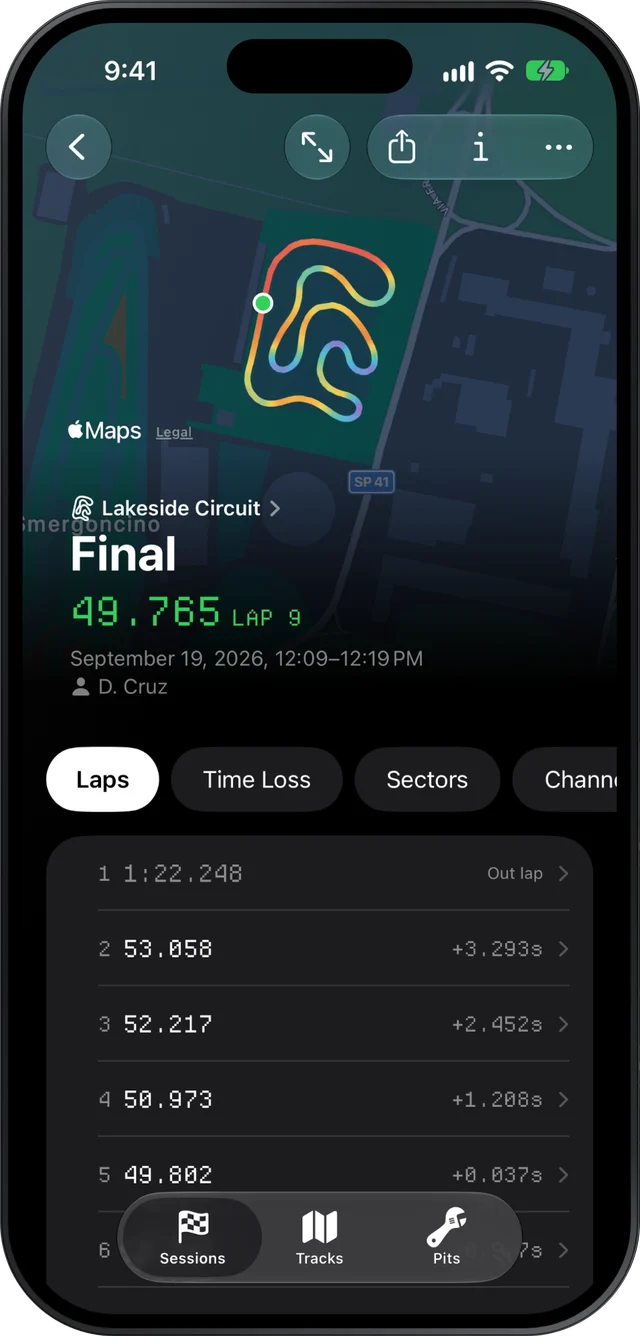
Slicks reads a MyChron or other AiM session on your iPhone or iPad in the paddock, with no signal, because it parses the file on the device. Between heats it opens on the answers: engine peaks against your window, the corners that cost the most time, sectors and lap-time spread. Sync to your other devices catches up when you are back in range.
Why it works with no signal
Kart tracks are often a long way from a good phone mast. Slicks does not send your file anywhere to be worked out. Its own parser reads the XRK or XRZ file on the phone, and every number on the session screen comes from that: the laps, the sectors, the theoretical best, the Time Loss ranking, the engine peaks.
What does wait for signal: syncing the session to your iPad and Mac, and making a share link for a coach or a parent. Both pick up on their own when you are online again. Nothing you read at the track depends on them.
Getting the file to your phone in under a minute
Slicks does not download from the logger, so the file comes off with AiM's tools first. What matters at the track is the next step, and the fastest route depends on what you download with:
- A Mac in the awning: AirDrop the file straight to the phone. No signal needed.
- A Windows laptop: a USB stick. Copy the file on, plug the stick into the iPhone or iPad (USB-C, or through an adapter), and open it from the Files app. No signal needed.
- AiM's RaceStudio 3 app on the phone: the session is already on the phone. Check how that app shares a session file before the weekend, since that step is the one left.
- A shared folder such as iCloud Drive, Dropbox or Google Drive: fine when both ends have signal, slow or stuck when they do not.
Download after every session, not at the end of the day. A session read before the next one is called is worth ten read on Sunday night.
What to check depends on what is next
A club weekend usually runs practice, a qualifying session of six to ten minutes, heats of seven to twelve laps and a final of sixteen to twenty-five. Each gap has one question worth answering:
| Next up | The question | Where to look |
|---|---|---|
| More practice | Did the change work? | Best lap, theoretical best and sectors, against the last session's |
| Qualifying | How fast do I get up to speed? | The Laps page: which lap was your best, and how far the first flying lap was off it |
| Another heat | Is the engine happy, and where is the time? | Setup's engine peaks, then the top corner on Time Loss |
| The final | Can I hold the pace for twenty laps? | Consistency on the Laps page: the spread, and how many laps were within half a second of the best |
A few notes on reading these quickly:
- After practice, look at the sectors before the lap time. A change that helped one part of the track and hurt another can leave the lap time flat while the sectors say plenty.
- Before qualifying, if your best lap kept coming late in the session, the short qualifying run will end before you get there. That is a tire pressure question for the mechanic as much as a driving one.
- Between heats, if peak RPM, exhaust or water temperature is outside the window, that is the change. Our page on exhaust and water temperatures explains the windows.
- Before the final, a wide spread with a fast best means the speed is there and the laps are not repeating. Our page on lap time consistency goes into it.
Write it down before you look
When you bring in a single new session, Slicks asks what changed on the kart before it shows a single number: gearing, pressures, carb, axle, track width, caster, new tires. Fill it in. It takes seconds, and it is the only time of the weekend your memory of the change is not coloured by the lap time.
The kart setup also takes the sprockets as front and rear teeth, cold pressures for all four tires, the tire set and whether it is new, the carb, and the session type, from practice to the final. By Sunday you have a record of every change and what came after it. Our page on keeping a kart setup log shows how to make that habit stick.
After the day
At home, the sessions are on your iPad and Mac once sync has caught up, with the newest sessions' files downloading in the background. That is the time for the slower work: two laps raced against each other with the gap drawn along the lap, every channel against one distance axis, playback at 1×, 2× or 4×.
Its limits at the track are worth knowing before you rely on it: Slicks does not download from the logger, it has no live telemetry while the kart is running, and it does not overlay one session on another. Two laps can be compared only when they are in the same session.
