
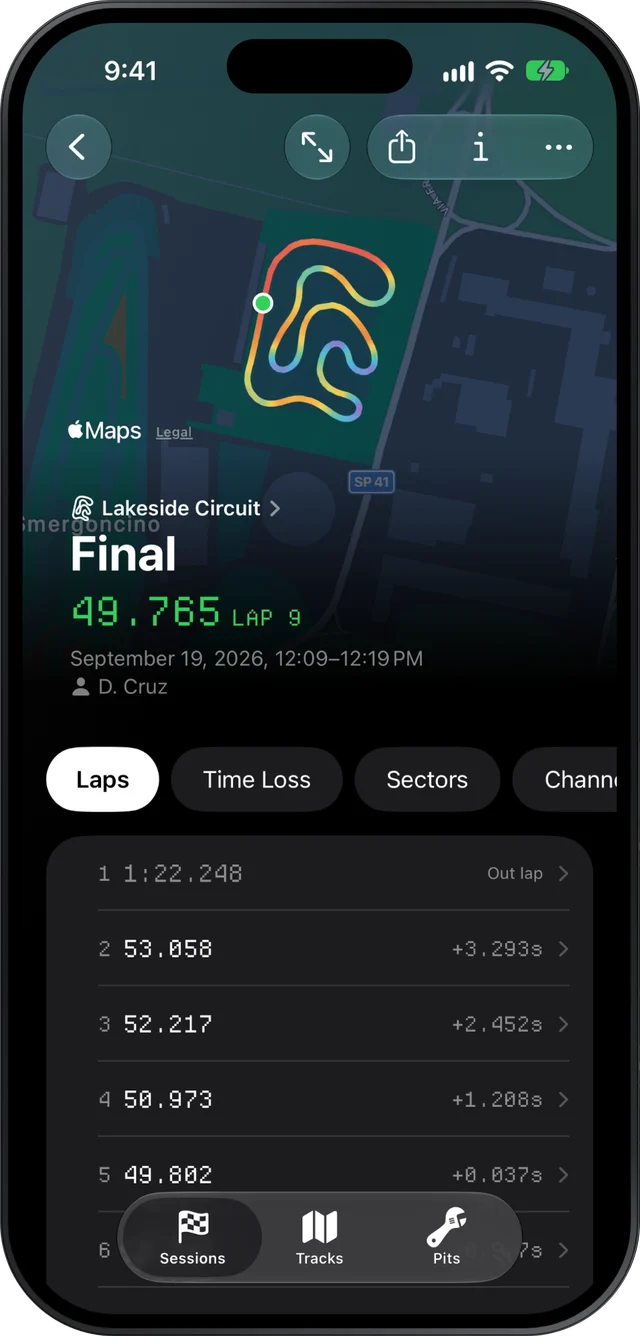
Slicks gives a karting parent the few answers that matter after a session, on the phone in your pocket: every lap time, how consistent your driver was, the one corner that cost the most, and whether the engine stayed in its window. It opens your kid's MyChron or AiM file with no laptop, and keeps a log of what you changed.
Why the data feels like too much
A MyChron records dozens of channels, many times a second, for every lap. RaceStudio lays all of it out for an engineer. You are a parent who also does the tires, the gearing, the fuel, the snacks and the drive home. The honest answer is that most of those numbers are not for you, and almost none of them are for your driver.
With a young driver, the data has two jobs. It tells you whether the kart is right, and it gives the kid one clear thing to work on. Anything beyond that tends to turn a fun day into a lecture.
The two numbers and one corner worth looking at
Open the session and start on the Laps page.
- Consistency. Slicks shows how spread out the lap times were and how many laps landed within half a second of the best. For a cadet or a mini driver this is the number to watch over a season. A kid who goes from four laps within half a second to ten has learned something real, even if the best lap barely moved.
- The theoretical best. On the Sectors page, the best time through each sector adds up to a lap your driver has already driven, in pieces. It is the friendliest number in karting: nothing in it is a guess.
- One corner. The Time Loss page ranks the corners that cost the most against the fastest lap. Take the first one only. Tap it and Slicks opens the lap that lost most there, raced against the best one, so you can see whether the braking point moved or the corner was just slower.
That is enough for the ten minutes before the next session. If you want more, the beginner's guide to reading kart telemetry explains the speed trace and the gap chart in plain language.
Keep a log so the weekend gets remembered
By Sunday night, nobody can remember what was changed on Saturday morning. Slicks asks for it at the moment you import a single new session, before it shows you a single lap time. That is on purpose: once you have seen a fast lap, it is very easy to remember the change that "obviously" made it fast.
You can record:
- what changed: gearing, pressures, carb, axle, track width, caster, new tires, or something else
- the gearing as front and rear sprocket teeth
- cold pressures for all four tires
- the tire set, and whether it was new
- the session type: practice, warm-up, qualifying, heat, prefinal, LCQ or final
Do it in the pits with the kart still warm, even if you only fill in what changed. The Setup page then shows that log beside the engine's peaks, so a month later you can see what the kart was running when your driver set their best at that track. Our page on keeping a kart setup log goes further.
Sharing a session with the coach or the tuner
If your driver works with a coach, you don't need to hand over a laptop or export anything. With Slicks Pro, a session's Share menu's Share Link makes a read-only web page the coach opens in a browser: best lap, sectors against the best in each, theoretical best, engine peaks, consistency, the setup and your notes. No app, no account. Stop Sharing turns the link off whenever you like, and the original file is never reachable through it.
When the coach wants every lap, use Send File from the same menu and they open the XRK in their own copy of Slicks. More on how coaches use it is on the page for karting coaches.
Using the phone at the track
The file comes off the logger with AiM's own tools, as it does today. Once it is on the phone, by AirDrop or from the Files app, Slicks opens it on the device, with no internet needed. That matters at tracks where the signal disappears behind the pit building. When you are back in range, the session syncs to any other device signed in to your account, so you can look again at home on a bigger screen.
Keeping it encouraging
Data can make a young driver feel watched. A few habits help:
- Lead with what went right. Find the sector where they matched or beat their best and say so first.
- Give one thing to try. One corner, written in the session's Notes so you can check it after the next run. Not three.
- Let them hold the phone. On the full map, hold a finger on the track to read the speed at that exact point. Kids like finding their own fastest spot on the lap.
- Leave the engine to the adults. Peak RPM and exhaust temperature against the window are your job, not something to discuss on the grid.
What Slicks does not do for parents: it does not download from the logger, it cannot lay your kid's lap over another driver's separate session, and it has no engine presets for mini or micro engines, so judge those peaks against your engine builder's numbers.
